 Alteris Docs
Find out which contracts say what, in seconds
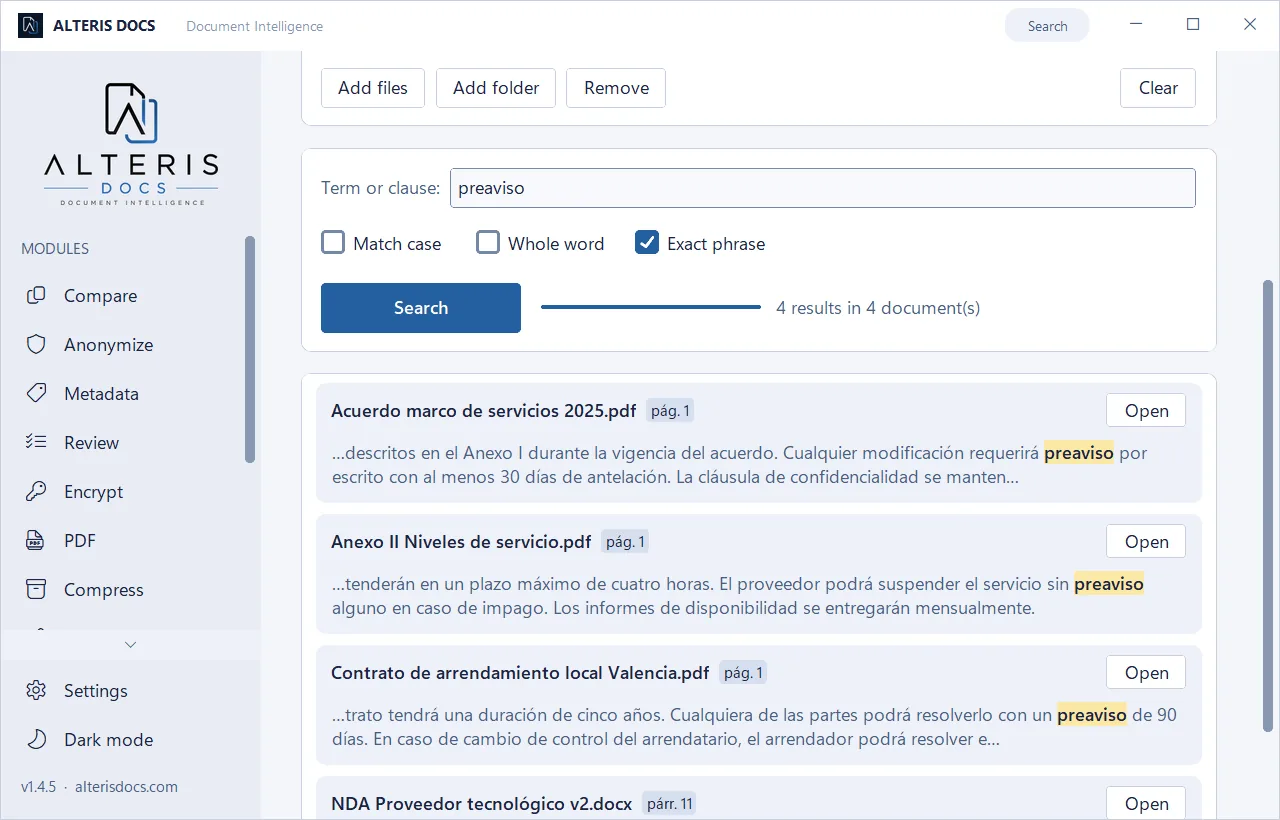
Add a folder with all of a client's contracts, type “notice” or “change of control” and Alteris Docs shows you every occurrence, with the surrounding text and the exact page or paragraph.
Everything is processed on your PC: documents are never uploaded to any server.
What you can do
- Searches every PDF and Word file (.docx and .doc) in a folder and its subfolders at once.
- Results with the text snippet and the page (PDF) or paragraph (Word).
- Options: match case, whole word or exact phrase.
- Open the document from the result with one click.
How it works
Add the documents
Individual files or a whole folder.
Type the term or clause
For example, “notice” or “governing law”.
Click Search
Check the results and open the document you need.
Frequently asked questions
Does it search inside scanned PDFs?
Only if they have a text layer. Run scans through the OCR in PDF tools first.
How many documents can it go through?
There is no fixed limit: you can add whole folders with their subfolders.
Are documents indexed in the cloud?
No. The search runs on your computer every time you start it.
Other modules
Try it with your own documents
Windows 10 and 11. Free plan, no card required. Want to see the professional modules? Ask for a demo at info@alterisdocs.com.