 Alteris Docs
Everything you do with a PDF, without uploading it
Websites that merge or convert PDFs ask you to upload the document to someone else's server. With Alteris Docs you do it on your computer: merge, split, extract pages, Bates-number, convert, run OCR and verify signatures.
Everything is processed on your PC: documents are never uploaded to any server.
What you can do
- Merge several PDFs in the order you choose and split one by pages or ranges.
- Extract the pages you need into a new PDF.
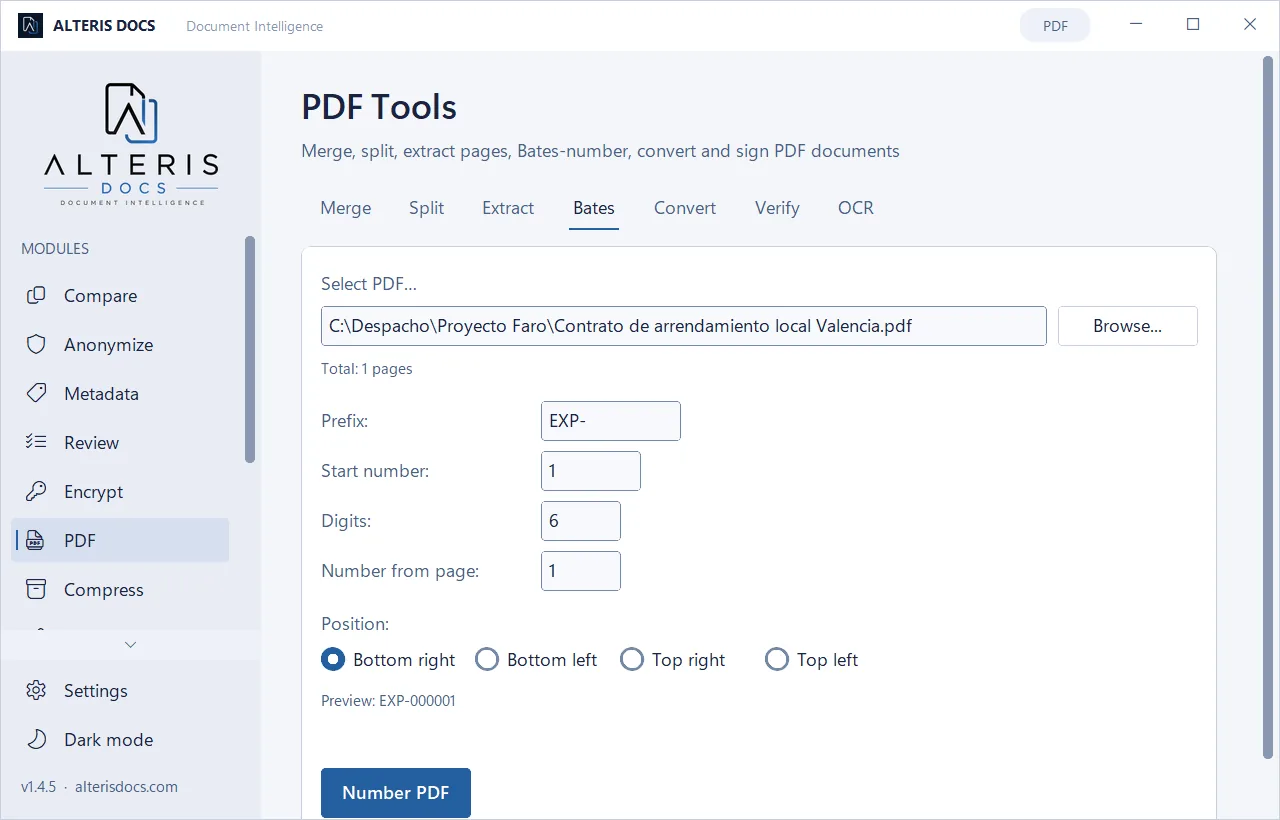
- Bates numbering with your choice of prefix, starting number, digits and position.
- Convert PDF to Word, Excel, PowerPoint, JPG or HTML, and Word, Excel or PowerPoint to PDF (with Microsoft Office or LibreOffice installed).
- OCR to make scanned PDFs searchable (requires Tesseract-OCR installed).
- Verify the digital signatures in a PDF: signer, date and certificate validity.
How it works
Choose the tool
Merge, Split, Extract, Bates, Convert, Verify or OCR.
Add the PDF or PDFs
Drag them in or pick them with Browse.
Run it
The result is saved as a new file; the original stays unchanged.
Frequently asked questions
Is it safe to merge or convert PDFs on a free website?
Those sites receive a copy of your document. If it is confidential, it is better to do it on your own computer, as with Alteris Docs.
What is Bates numbering?
A sequential number on each page (for example EXP-000001) so that specific pages of a bundle can be cited unambiguously.
Is it included in the free plan?
Yes, PDF tools is a free module.
Other modules
Try it with your own documents
Windows 10 and 11. Free plan, no card required. Want to see the professional modules? Ask for a demo at info@alterisdocs.com.