 Alteris Docs
Sign your PDFs with a digital certificate, one at a time or in batches
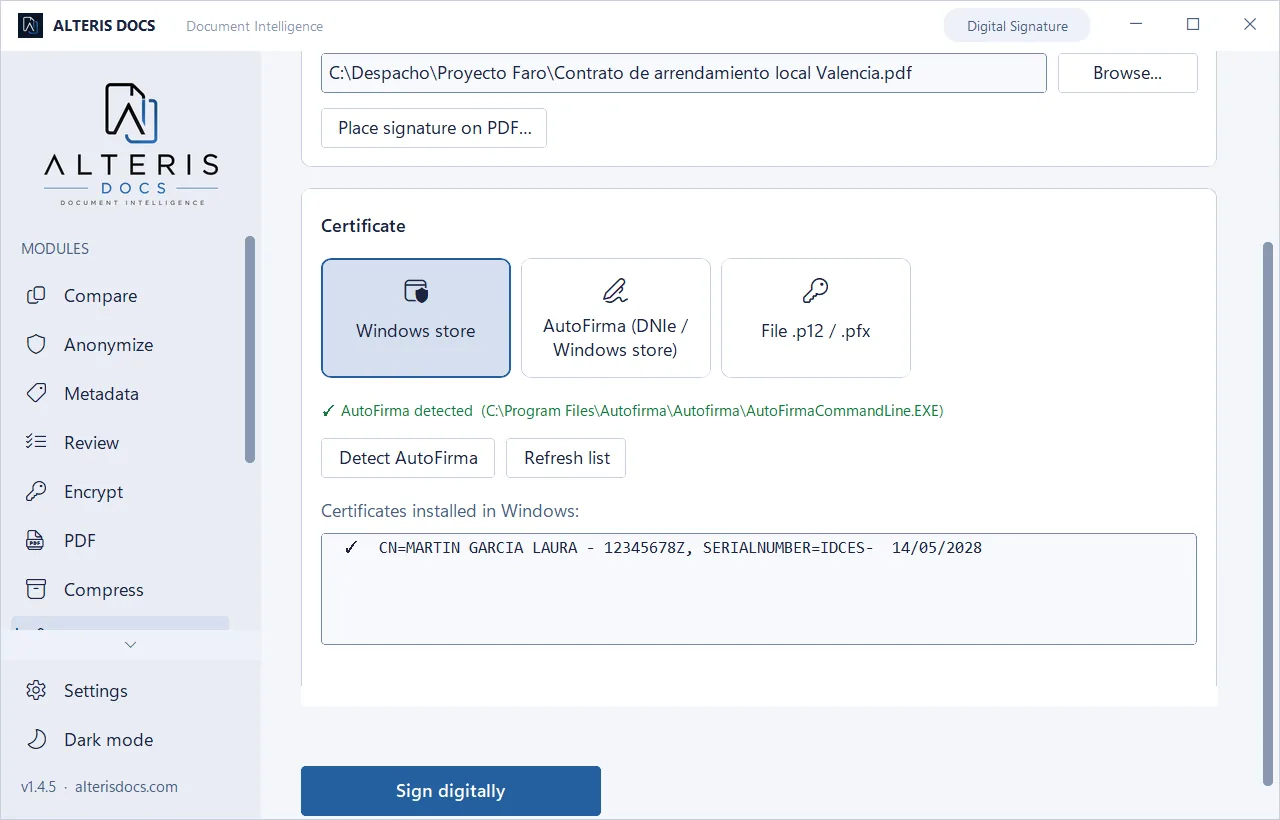
Use the certificate you already have installed in Windows, a Spanish electronic ID (DNIe) through AutoFirma, or a .p12/.pfx file. The signature is PAdES, valid throughout the European Union under the eIDAS regulation.
Everything is processed on your PC: documents are never uploaded to any server.
What you can do
- Certificates from the Windows store, AutoFirma (DNIe) or a .p12/.pfx file.
- Visible signature stamp: draw the box wherever you want it.
- Batch signing: add a folder and sign every PDF at once.
- RFC 3161 timestamping (FreeTSA, DigiCert or the server you choose), proving the document existed at that date and time.
- Optional reason and location for the signature.
How it works
Choose the PDF
Or several, in the Batch signing tab.
Select the certificate
From the list of installed certificates, AutoFirma or a file.
Click Sign digitally
The signed PDF is saved, and any reader can validate it.
Frequently asked questions
Is it legally valid?
Yes. It is a PAdES signature that complies with the European eIDAS regulation. With a qualified certificate it is an advanced electronic signature based on a qualified certificate.
Do I need AutoFirma?
Not for certificates installed in Windows or for .p12/.pfx files. AutoFirma is only needed to sign with the Spanish DNIe.
Is it included in the free plan?
Yes, Digital signature is a free module.
Other modules
Try it with your own documents
Windows 10 and 11. Free plan, no card required. Want to see the professional modules? Ask for a demo at info@alterisdocs.com.