 Alteris Docs
What your files say without you seeing it
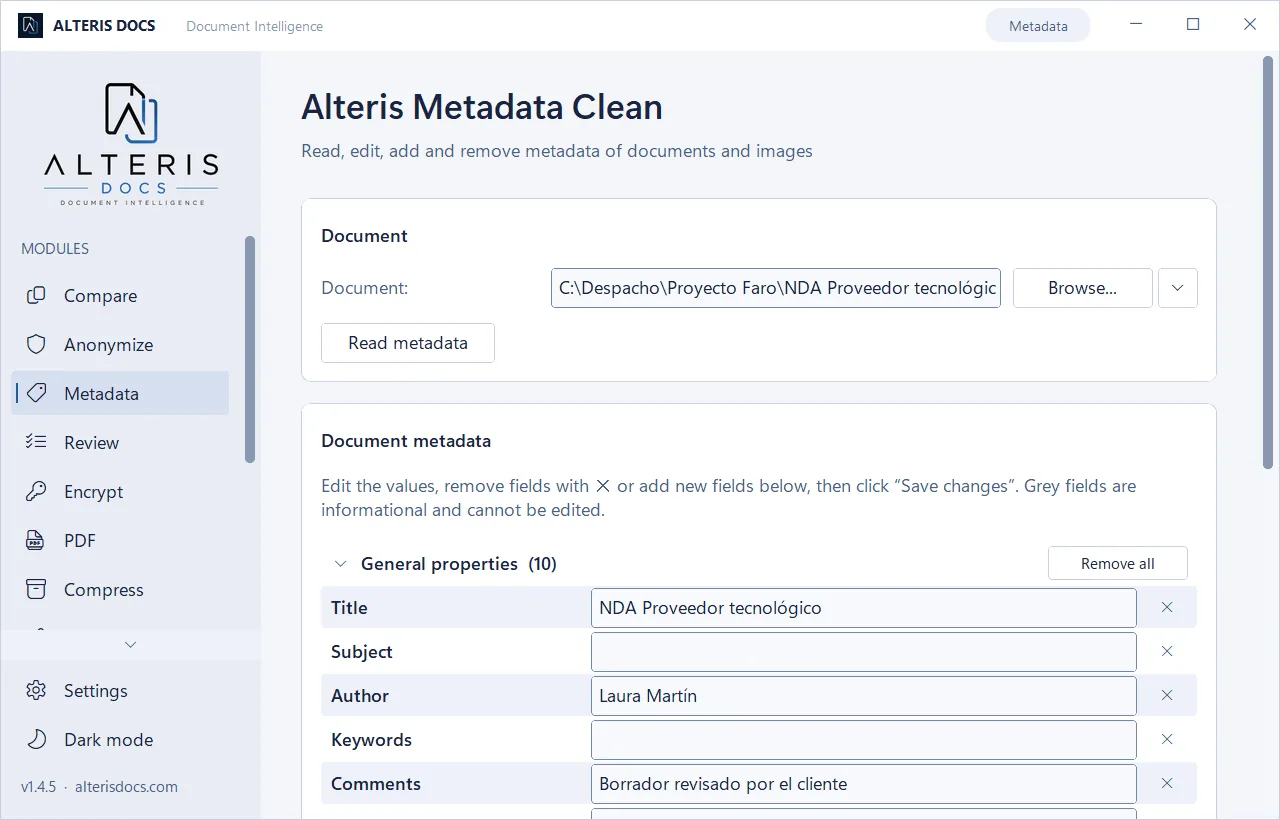
A Word file or PDF keeps the author, the company, the dates and sometimes the names of the people who reviewed it. A photo may keep where it was taken. Alteris Docs shows you all of it and lets you edit or remove it before you send the file.
Everything is processed on your PC: documents are never uploaded to any server.
What you can do
- PDF, Word, Excel, PowerPoint and images (JPG, PNG and more).
- General properties, custom fields, XMP, EXIF, IPTC and GPS location.
- Edit any field, remove it with one click or add new fields.
- Word reviewers and commenters: rename or remove them.
- Backup of the original and a warning if the PDF is signed (changing it would invalidate the signature).
How it works
Choose the file
A document or an image.
Click Read metadata
You see the fields grouped by type.
Edit, remove or clean
Save your changes or remove all metadata in one go.
Frequently asked questions
Why remove metadata before sending a document?
Because it can reveal who drafted it, for which client, when, or the names of the colleagues who reviewed it. That is information you do not always want to share with the other side.
Can I change the author instead of deleting it?
Yes. Every field can be edited, and you can add new fields too.
Is it included in the free plan?
Yes, the Metadata module is free.
Other modules
Try it with your own documents
Windows 10 and 11. Free plan, no card required. Want to see the professional modules? Ask for a demo at info@alterisdocs.com.