 Alteris Docs
Shrink your documents so they fit in an email
A report with photos or a scan can weigh tens of megabytes and not fit in an email or an e-filing portal. Alteris Docs shrinks PDF, Word and Excel files by optimizing their images, and also creates and extracts archives.
Everything is processed on your PC: documents are never uploaded to any server.
What you can do
- Shrinks PDF, Word (.docx) and Excel (.xlsx) files.
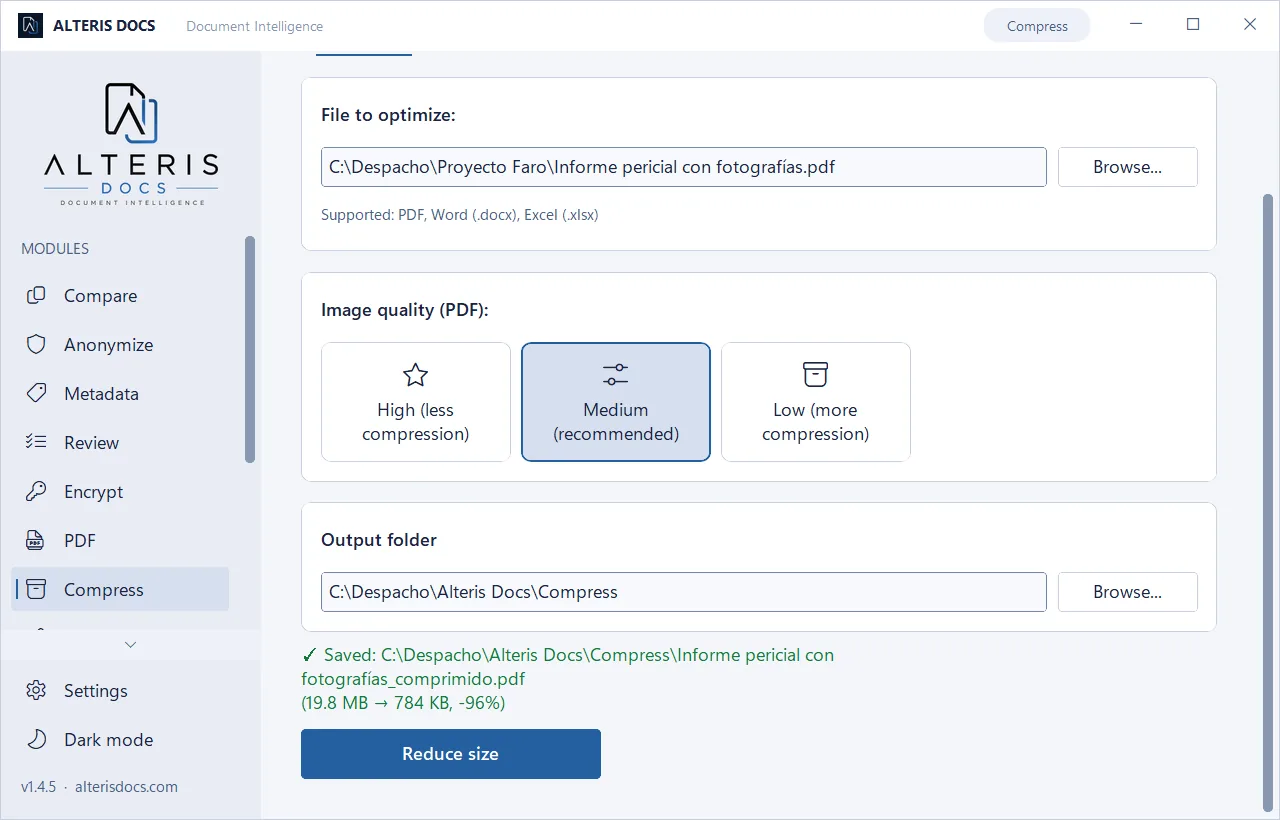
- Three image quality levels for PDF: high, medium (recommended) or low.
- Shows the size before and after, and the percentage saved.
- Creates ZIPs from several files or folders, with three compression levels.
- Extracts ZIP, RAR, 7z, TAR, GZ and BZ2, including password-protected ones.
How it works
Choose the file
A PDF, Word or Excel file.
Pick the quality
Medium is a good balance between size and sharpness.
Click Reduce size
A lighter copy is saved; the original stays unchanged.
Frequently asked questions
How much smaller does a PDF get?
It depends on what it contains. PDFs with lots of photos or high-resolution scans shrink a lot; a text-only PDF barely changes, because it is already small.
Is quality lost?
Images are optimized according to the chosen level; the text does not change. At high quality the difference is hardly noticeable.
Is it included in the free plan?
Yes, Compress is a free module.
Other modules
Try it with your own documents
Windows 10 and 11. Free plan, no card required. Want to see the professional modules? Ask for a demo at info@alterisdocs.com.